Bring a comment into your video.
Start a tutorial with the question it answers. Create a YouTube-style comment, highlight the useful words and cut straight to your demonstration.
Create a comment video MP4 / WebM · 2–8 s · No watermark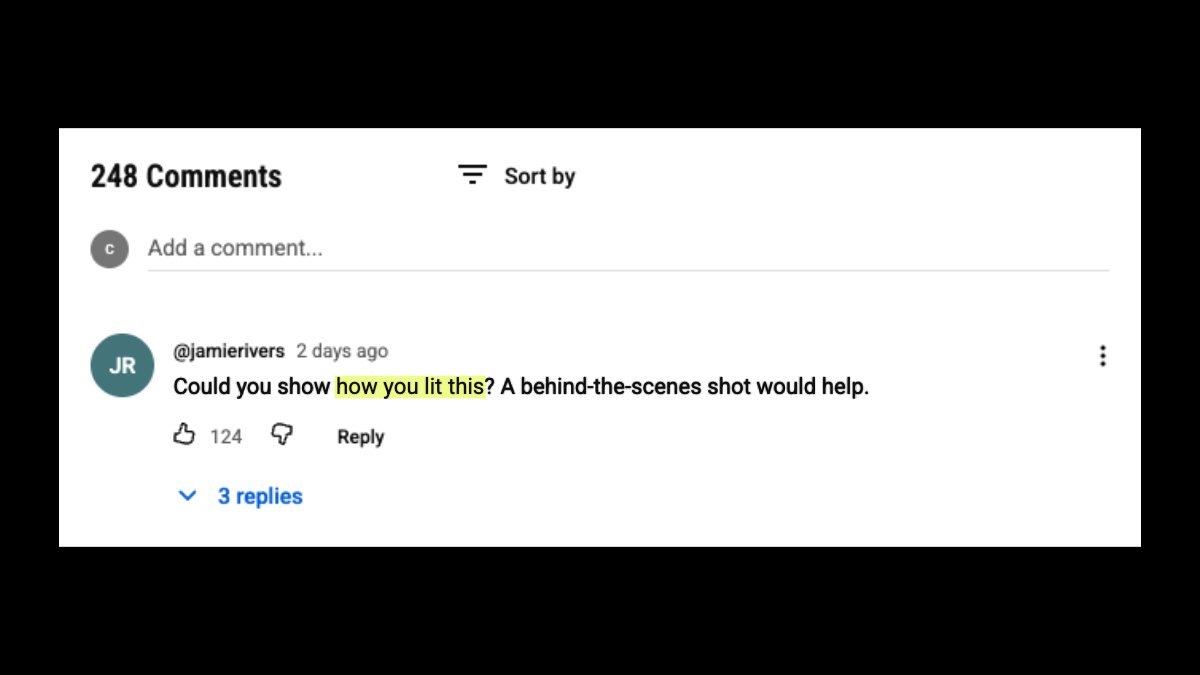
Three questions worth showing on screen
Answer a lighting question
Highlight the question, then reveal the light placement. Keep the comment short so viewers can read it before you begin moving equipment.
Try “how you lit this”Explain a gear choice
Introduce the question before showing the lens and its effect on the shot. The next image should answer what the comment asks.
Try “which lens”Show your editing settings
Use the comment to introduce a screen recording. Reveal the settings in your editor, then show what changes when you adjust them.
Try “the final settings”
Make the question readable
- Open a preset and choose Edit details. Enter the comment and author handle, then add an avatar. You can edit the displayed age, likes, reply count and total comments.
- Select the words you will answer directly in the full comment. Highlight the specific question your footage explains.
- Choose a format and duration. Three seconds is a starting point for a short question. Preview at phone size and allow more time if the wording takes longer to read.
- Export the clip, then place your spoken answer or demonstration after it in your video editor. Add captions for the answer there if your edit needs them.
YouTube also has a native “reply with a Short” flow: it can show the selected comment as a sticker and connect the reply to that comment. CUTROOM makes a separate clip for an external edit; it does not publish, link a reply or notify the commenter. YouTube’s comment-reply Shorts guide.
Before you export
Can I import a comment from its URL?
No. Enter the wording and author details manually. When recreating a real question, keep its meaning and attribution.
Does it add a reply on YouTube?
No. Exporting a clip does not post a comment or reply. Use YouTube’s own reply tools if you want the platform to connect your Short to the original question.
How much of the comment can I show?
The full text accepts 180 characters and the highlight accepts 36. A longer discussion needs a shorter, clearly identified excerpt or several separate clips.